
GeoData Modeler is a productivity solution for managing and reporting the geodatabase schema — an essential tool for any GIS data modeler as well as management and non-technical staff within an enterprise.
Examine a geodatabase from a new point of view
GeoData Modeler allows for a broad view of the entire geodatabase schema in a single, multi-tabbed Excel spreadsheet. This format offers extensive access to the schema that cannot easily be done with ArcCatalog alone. Leveraging the power of Excel’s sorting, filtering and pivot tables allows users to analyze the data model for inconsistencies and errors in a familiar format, make changes and updates, and compare multiple databases – to scrutinize your valuable data from a new point of view.
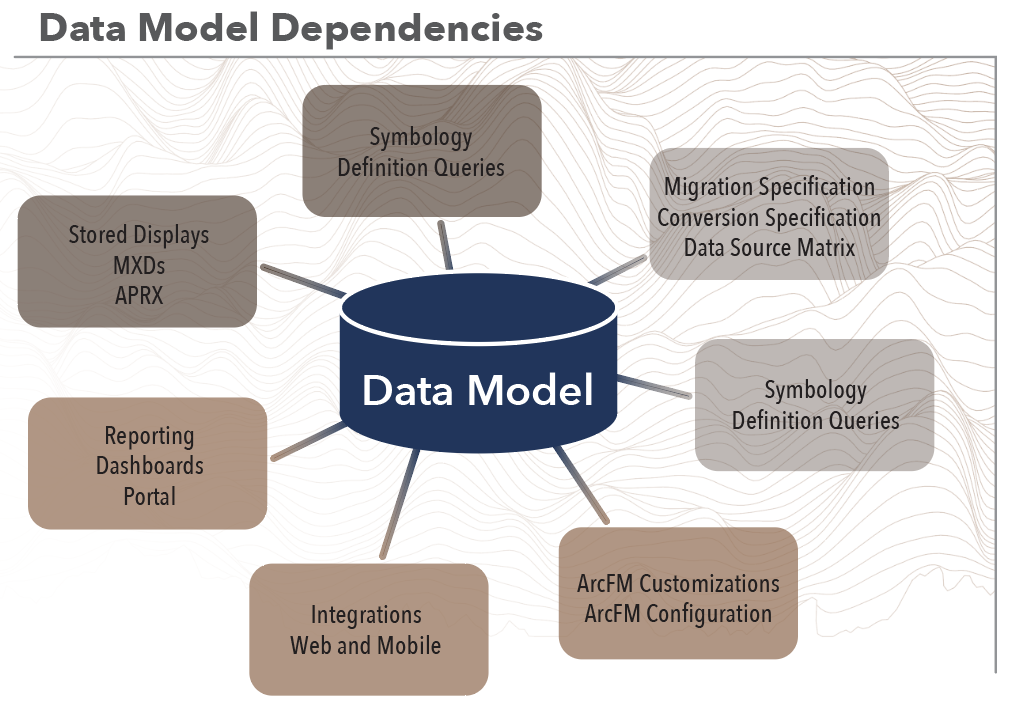
The data model is the heart of the enterprise GIS. All downstream applications, configurations, analysis, and display are dependent on the data model. Any change to the model can adversely affect these downstream dependencies, and therefore reporting, comparing, and updating the model become essential processes in data model configuration management.
Report the contents of a geodatabase
GeoData Modeler allows users to quickly report the data model of a given geodatabase. A spreadsheet details geodatabase properties in an easy-to-use format, and a formatted HTML report is generated that can easily be shared within the enterprise.
GeoData Modeler is integrated with ArcFM, reporting ArcFM properties such as Field Info, Model Names, Field Model Names and Object Info.
Our ArcGIS Pro version reports Pro extended properties such as Attribute Rules and Contingent values. Additionally, The Pro version reports Utility Network properties such as UN Domain Networks, UN Tiers, UN Rules, Un Edge Connectivity and UN Subnetwork Asset Properties.
Baseline reporting of a geodatabase can be a starting point for developing a new data model, or used to review and understand what is actually modeled in a mature enterprise geodatabase.
Compare the contents of a geodatabase
GeoData Modeler quickly compares the contents of a geodatabase to the baseline report, or directly between two geodatabases to report their differences — an invaluable asset for enterprises with multiple development, test, pre-production, and production geodatabases.
Keeping all the enterprise’s schemas in sync used to be a nearly impossible task, but we have simplified the process. Differences between compared databases are clearly identified, showing adds, deletes, and property differences, as well as previous values for auditing.
Update the Schema of a Geodatabase
GeoData Modeler makes the task of keeping your environment in sync easy by creating update Python scripts based on differences between compared databases. The same update scripts can be used for development, test, UAT and production geodatabases to ensure all updates are done consistently. Updates are quickly validated with the comparison function to make sure that the enterprise’s schemas are in sync.

Anomaly Report
GeoData Modeler Anomaly report detects issues with the integrity of the geodatabase. Manually detecting data model anomalies can be an impossible task. The Anomaly Report shows where invalid or inconsistent behavior exists in the data model, from inconsistent field aliases to field and domain type mismatches. The Anomaly Report quickly identifies these errors and inconsistencies.
HTML Report
GeoData Modeler HTML Report is a user-friendly view of the data model. This report is a simplified view of the data model but in a format that is easily digestible by non-GIS users and can easily be shared across the organization.
FROM OUR CUSTOMERS
Peoples Natural Gas

Peoples Natural Gas provides safe and reliable gas service to approximately 700,000 homes and businesses in their service area. They have used GeoData Modeler since 2018 to assist with data model integrity.
“We use this day-to-day to help other departments within the company know our data schema for integration,” says Scott Ewart, the GIS Lead at Peoples Natural Gas. “This is also the go-to source for any questions that arise related to our data model.”
GeoData Modeler provides many essential functions for the utility, most notably related to continuity between data updates and real-world applications. Ewart says, “Making the changes in our QA instance and testing everything before pushing that to production is a big win. Knowing we have field consistency across all tables is also very helpful.”
“Being able to take new data models and compare them to our existing data model is a huge benefit,” says Ewart. Keeping an enterprise’s schemas in sync can be a nearly impossible task, but GeoData Modeler simplifies the process, providing clearly identified differences between compared databases. Ewart explained, “This has saved us a lot of time trying to understand the changes and then pick the changes that need to be implemented.”
GeoData Modeler is a valuable tool for utilities responsible for providing efficient and reliable services to their customers. A geodatabase is a critical component of service management. Optimizing data management with GeoData Modeler can save money and time, making it a wise business choice.


Model Update Promotion
Data Model updates and promotion of the changes are an integral part of configuration management for the geodatabase. Each organization may have a different workflow for these processes, but the progression remains the same.
This sample diagram generalizes the steps necessary for promotion of a data model update to production. The cycle starts with requirements gathering, which is the process of identifying the next change. The steps in requirements gathering include discovery, analysis, and defining when the requirement is ready for development. The development phase of this cycle includes completing items, unit testing and identifying when each item is ready for test. The test phase of the cycle is to identify if the item is ready for User Acceptance Testing (UAT). The UAT phase tests to determine if it is ready for production, and at this point the release notes are created by the development team and business. The production deployment phase includes deploying the changes to production, confirming those changes against the UAT database, smoke testing, releasing to production and sharing release notes with the users.
Change the workflow for the whole team
GeoData Modeler solves several issues your team members will encounter during all phases of data model management for promotion of changes from development, test and eventually production.
| Team Member | Current Problem | GeoData Modeler Solution |
|---|---|---|
| Project Manager | No single source of geodatabase documentation, development and implementation. | A single source for data model documentation, validation and update capabilities for entire project staff. |
| Business Analyst | No tools to consistently gather and define data model change requirements. | Provides a unified data modeling template for all proposed changes to the data model. |
| Data Model Architect | Cannot efficiently and consistently develop and validate data model changes with the tools that are commercially available. | A single environment for all data model updates, which can be validated as soon as the implementation is complete. |
| Business Lead | Cannot efficiently and consistently communicate data model change to end users. | Comparisons between environments for ArcGIS and ArcFM delta gathering, which are the basis for release notes. |
| Testing Team | Huge effort to consistently and efficiently validate data model changes. | Automatic validation of updates as they are promoted in lower environments and final implementation into the production environment. |
| Training Team | Struggle continually try to keep training materials in sync with data model updates. | Rapid delta creation allows for streamlined updates of training materials. |
FROM OUR CUSTOMERS
Madison Gas and Electric

At MG&E we have integrated Laurel Hill’s GeoData Modeler product into our continual GIS schema update routines. Using GeoData Modeler we ensure that our schema updates are thoroughly tested, and deploy as expected to our various development, testing, and production environments. This product builds confidence in our deployments and has saved us countless hours of ad-hoc testing and manual comparisons between environments. Also the reports, such as the ArcFM Properties report, ensure that we are able to keep consistency across our ArcFM feature classes, provide our end users more insight into the GIS model, and provide the ability to quickly review important settings. I recommend GeoData Modeler to any GIS administration team with an enterprise ESRI geodatabase, and especially so to those with Schneider ArcFM.
—Chris Link, Supervisor – Distribution Systems Technology
Licensing, Support and Maintenance
Required Annual Maintenance fee includes software upgrades, bug fixes, and technical support. The first year of maintenance is complimentary.
Ready to get started?
Let us show you what GeoData Modeler can do for your geodatabase.